Assess the cohort. Close the gaps. Run the drive with evidence.
QERIONN Placement Readiness gives your TPO one place to assess a cohort,
run Assessment Centre papers, identify readiness gaps, mark students Ready
for Hire, manage placement activity and export auditable drive/outcome data.
Optional Exam Cell add-on for sealed university finals.
QERIONN does not guarantee placement.
Campus Assessment Centre is ₹29/mo per student
(₹349/year if billed annual, for a committed 10–100 cohort) —
Assess → Diagnose → Improve → TPO validates Ready for Hire → drive → evidence.
GST extra as applicable.
You're here — Placement Readiness for the TPO: Assessment Centre papers, Ready for Hire, and drive evidence. Optional Exam Cell vault is a separate add-on.
2
Request Access
Share your institution's details and an authorised staff contact.
3
Review & Approval
QERIONN reviews the request before any account is created.
4
Staff Login
Approved staff sign in to a portal scoped only to your institution's own data.
5
Setup & Batches
Structure departments and programs, then import students into a batch and manage it going forward.
What's actually available
Live in the portal today
Available for approved institutions
Cohort, batches and roster
Departments, programs and batches the way your campus actually runs
Import a roster, invite students, keep the TPO view scoped to your institution
Assessment Centre papers: question sets, JD drive 5→50→10, students sit
Available for approved institutions
Bulk student import
Upload a spreadsheet roster
Preview every row before anything is saved
Confirm the import — mistakes are caught before they become student accounts
Available for approved campuses
Placement Readiness assessments
Assess the cohort, see readiness gaps, run targeted evaluations
TPO marks Ready for Hire — never auto from a score, never a salary prediction on the student screen
Export auditable drive / outcome evidence. Placement is not guaranteed
10-Student Evaluation Pass
Frequently asked
Does the campus include papers and exams?
Yes. Assessment Centre papers are in the campus product — question sets, JD drive 5→50→10, students sit. Optional Exam Cell add-on for sealed university finals (separate SKU; QERIONN cannot read plaintext). Ready for Hire is TPO-only. Placement is not guaranteed.
Is the evaluation pass a coupon?
No. It is an institution-bound 10-student programme. Checkout rejects QEP codes as coupons.
Can we try it on our own students first?
Before purchase, we can run a 10-student Evaluation Pass on your own cohort. It is not a cheap demo SKU.
Can the TPO add companies and JDs?
Yes, on the institution portal. TPO can upload a company JD to shortlist their own cohort and run a targeted evaluation — not “we place you in that company,” and not a public job board.
When can we invite students?
After you start now or schedule a launch in the Pilot Setup Wizard. Ready-to-activate cannot invite.
Does joining before the scheduled start use demo tools?
No. Pre-launch accept only occupies a seat. Entitlements start at the scheduled timestamp.
How does year-two support work?
Year 1 support is included. Active renewal with seats is still 100% of the seat commercial — internally 82% License and 18% Platform Support, never 118%. A ₹36,000 floor applies only if the campus keeps the portal with zero new seats.
The real interface
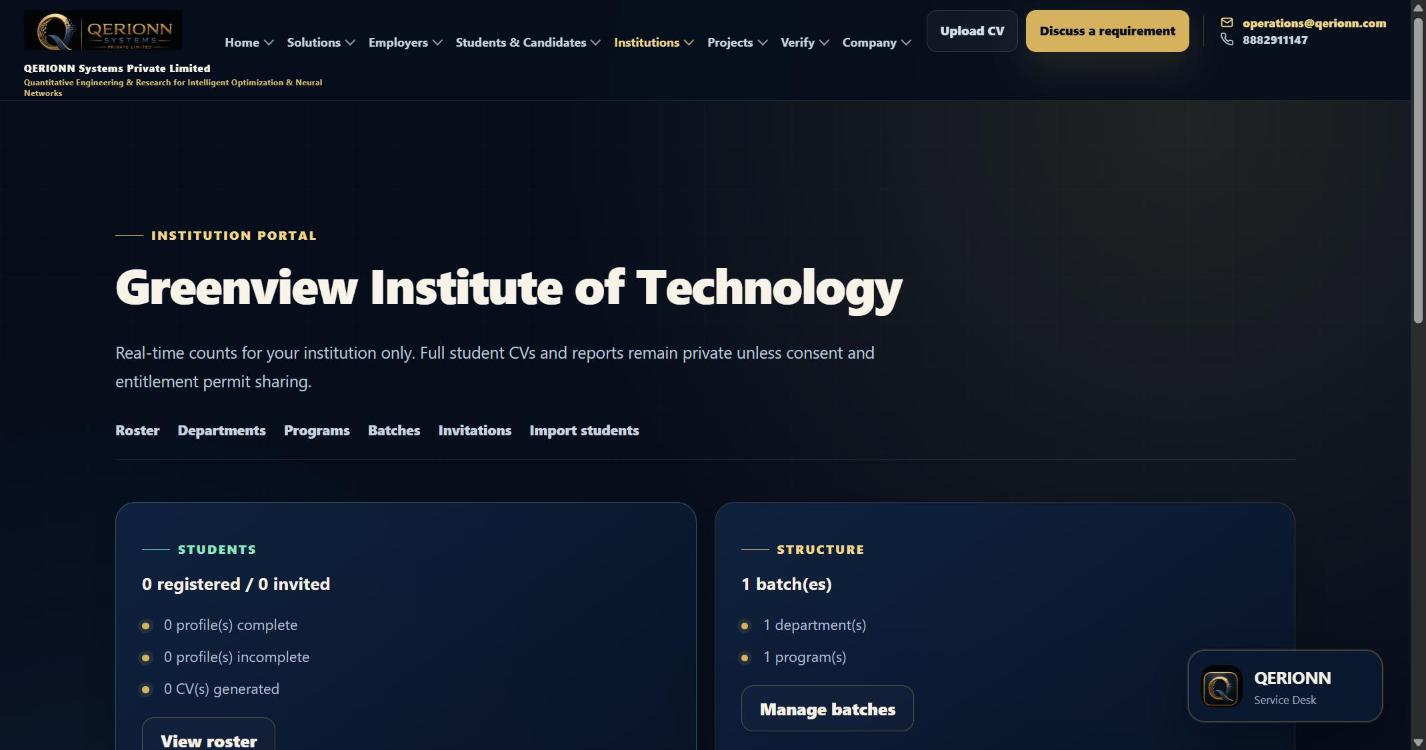
Your institution dashboard
A screenshot of the live portal, not a mockup.
Institution dashboard
Roster, departments, programs, batches, invitations and student import — scoped to your institution only.
What your students get
Readiness tools they use on their phone
Students take assessments, see their own progress, and download
certificates they can verify. The student-facing band for Low is
“Developing” — they never see a rupee CTC range. Campus Branding
Included puts your logo and name on that chrome. Add to Home Screen
is the campus app for this programme. White Label is a separate
rung: your own domain, with QERIONN hidden on the student interface.
Important:
Institution access is reviewed, not automatic. QERIONN does not
guarantee a placement or hiring outcome. GST extra as applicable.
Exam Cell is an optional sealed-finals add-on — not the whole campus pitch.